A common theme in this blog is communication. It is key to so many elements of my job as a DL (distributed learning) teacher.
E-mail
Lately I'm finding it is harder to get in touch with my students. E-mail is so oldschool for them. Students may have their own e-mail address, but often only check it once a week. I wonder if most high schoolers rely on messaging in Facebook as opposed to e-mail? That seems to be the way many of my friends 'e-mail' these days.
Landline
Phoning isn't the old standby it used to be either. It seems that for a lot of families the landline is the number they give the school, but in reality they don't use it much as each member of the family has their own cell. Once you track down the right person's cell number you might be ok. The students, though, they aren't so keen on voice calls. Instead they're all about texting.
These changes have really only come about in a big way in the past year.
Texting
So when my colleague suggested that we needed district issued cell phones for texting our students, I laughed at first and then realized that she was probably onto something! I don't use my person cell that much (and only learned how to text a few months ago--yes I'm a cell phone ludite) so I have a very limited plan. And I'm not keen on giving out my personal number to my students. Come to think of it, they're probably not that keen on giving out their cell number to their teacher!
Question Time
Do you text your students? If so, how have you set this up so that proper boundaries are set, both for them and for you? If you have students at a distance, how else do you keep in contact?
As always, thanks for reading what I write.
Photo Credits All images in this post are have Creative Commons Attribution-NonCommercial-NoDerivs Licenses.
A few years ago when I discovered Google Calendar, Docs, iGoogle, Reader and on and on and on I was really thrilled that I could have all my 'stuff' online and accessible from any internet ready device. I'm not sure that all of those apps have increased my workflow though. Ease of collaboration, yes! Ease of sharing, yes! Ease of access, yes! More work done in less time--well, not really.
Background
I teach at a distributed learning school. I am responsible for Science 8 - 12 courses as well as Math 8 - 11. The math courses are all paper based and the science courses are all online. My students work from home, but they have access to face-to-face tutorials, online tutorials via Elluminate, as well as help as needed via phone, e-mail and face-to-face. The students work asynchronously at their own pace. This means that it is rare that I mark two of the same assignments in a row.
When Technology Makes Life Decidedly Better
Part 1: Moodle
This fall my district undertook to host Moodle on its own server. Prior to this our online course offerings were through WebCT (an oldish version). In our Moodle courses assignments can be submitted electronically within the course, with alerts being sent to the teacher to let them know when new material is ready to be marked.
Part 2: HP Tablet Laptop
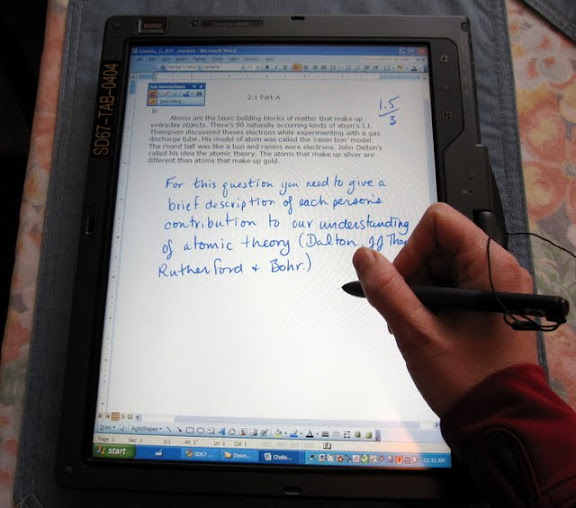
Our school has had 2 HP Tablet laptops for the past couple of years. If you haven't seen or used one of these, you have the ability to draw directly on the screen using a special pen. There is handwriting recognition software which can convert handwriting into typed text. Prior to this year I have used the tablets with a projector when teaching to write notes and instructions, just as you might use a felt pen and transparencies on an overhead projector.
Marking with the HP Tablet
Part 3: Putting It All Together
Here's what happens when you combine Moodle with the HP tablet.
I receive an e-mail alert that a student has submitted an assignment. I click on the link and am taken to the assignment in Moodle. I select the student's file which is downloaded on my computer and opened in word. Using the pen on the tablet I can easily mark and add comments to the assignment (marking with the pen tool is far easier than adding comment boxes). I then save the file with a new name. I go back to Moodle, input the grade, and upload the marked file. The student will now receive an e-mail alert to tell them that their work has been marked. Easy peasy!
Prior to using Moodle, when students e-mailed in their work I had to save it to a specific folder, mark it, go to my marks program to record the mark, save the marked file, attach it to an e-mail and send it to the student. Lots of clicks, lots of little pieces to remember to do.
Prior to using Moodle, most students did their work on paper and dropped it off at the school. There was a delay between the student finishing the work and me receiving it and then a delay between me marking the work and them picking it up. And then there are the (infrequent) times I'd forget to record the mark and the times that students claimed that they handed in their work but it disappeared or they claimed that the marked work never reached them. This doesn't happen with the new system! In addition, it is far more convenient to carry home just a laptop as opposed to envelopes of student work. Students also tended to hand in a whole whack of work all at once, preventing timely feedback. In Moodle students are less likely to do this.
I'm finding it difficult to convey how smooth and seamless the Moodle/tablet combination is! Let me just say that I actually look forward to marking now (sick, I know).
How 'Bout You?
Is there some system or technology that you use that actually helps your workflow to a significant degree? I'd love to hear about it.
Now if you'll excuse me, I'm going to see about getting all of those math courses I teach into Moodle ;-)
Earlier in the summer I read Disrupting Class, one of my summer PD goals. The following are my scattered reflections on the book.
*Note: the book focuses mainly on high school--I would be interested to see what teachers in the elementary grades have to think about the book.
Themes
Most schools approach teaching using the factory model; 30 kids in a class, assigned by age. It is difficult for teachers to address their students' individual learning styles. Some students get left behind and some get bored because everyone has to move along at the same pace. They mentioned that much of teacher training focuses on classroom management: an essential element in the factory model.
Technology can help; programs that teach kids according to their learning styles and only allow the student to move on when the student has mastered the content. We aren't there yet, but the authors are optimistic that collaborative on-line tools will be built that will allow teachers, students and others to create tutorials, lessons and so on that will help others to learn.
Cater to non-consumption. The authors point out that disruptive innovations usually target non-consumption. They give the example of the early SONY transistor radios; they were cheap and the sound wasn't great, but they were popular with teenagers who could not afford the only other option--big, expensive table top or floor model radios. Teenagers, previously non-consumers of radios, became the new consumers of the disruptive technology. In education the areas where we will see change is with courses that schools cannot offer due to student numbers and other factors. Distributed learning schools are not going to be successful if they are focusing on courses that regular bricks and mortars school already offer.
The disruptive innovations will not be successful under the current structures. He gave the example of Toyota's experience with hybrid cars. Toyota put together a team to build a hybrid from the ground up. They didn't have to use existing components and make do. They could re-engineer all of the systems so that the final product was efficient and worked well. Other car manufacturers did not take this approach, and their hybrid cars are inferior.
The Journey from Here to There
In my position as a teacher in a distributed learning (DL) high school I can see the growth in demand for a different model of schooling. In my district budgets are getting tighter and enrollment is dropping so creative solutions are being looked at. This fall all of our grade 10 students will be enrolled in Planning 10 (a core course) delivered in an on-line format. Doing Planning 10 on-line, outside of the time-table, will allow the students more choice; there won't be timetable clashes between planning 10 and other courses. It will also be possible for students to take more than a full load of courses. One can't help but wonder if being exposed to planning 10 on-line will encourage students to take other courses on-line, that currently are not offered at their school.
Right now, many of the on-line courses I have seen are not geared towards a range of learners. Typically, the kids who deal well with text, and are self disciplined enough to stick to a time line do well. There is not a lot of differentiation... yet. A lot of the talk at the distributed learning conference I attended in the spring (Virtual School Society Annual Spring Conference) was about how to cater to the big range of students who are now exploring distributed/on-line learning. People on the front lines want modular courses, where you can put together a course that is designed to meet the needs of the learner. I think we'll start to see these. Currently though, the cost to put together a complete on-line course can be quite high. I've heard estimates of $40,000 to produce one on-line course. On the one hand I am doubtful that we will see the modularity and differentiation that is written about in Disrupting Class, but on the other hand I am constantly amazed at the incredible applications that are available on the web, so who knows?
I'd like to know a bit more about the authors' visions of the role of the teacher in this new model. Right now as a DL teacher I can tell you that one of my biggest challenges is getting good lines of communication flowing between myself and my students. I've written about communication with my students here and here. Currently I rely on e-mail and phone to communicate with students, but recently it occurred to me that e-mail is very old school--I've got to explore the ways that my students are most comfortable communicating. For example, many students don't use e-mail, but are constantly texting; would they text me with their questions if that was an option? Canadian Perspective
It definitely seems like it is a much more tumultuous time in education in the USA than in Canada. Frequently in Disrupting Class the authors referred to the negative impact of teacher unions and the tension between public schools and charter schools. That is not to say that those tensions do not exist in Canada; just that the magnitude is much much lower.
The Wrap Up
Where do you see the future of on-line learning? If you read the book, what did you think of it? As always, thanks for reading my post!
Get more face-to-face time with my students (I work at a distributed learning school--students work at home on the curriculum that we provide): In the 07/08 school year my colleague, Jodie, ran a humanities class for her grade 8-10 students and I could see the benefits of this weekly face-to-face time; it allowed for discussions, one-on-one tutoring, and an opportunity to speak to students about their progress. So for this past school year Jodie and I offered a general high school class for 2 hours on Thursday mornings. Students were encouraged to attend, but for many students it was optional. For other students at risk for failure the class was mandatory. The benefit to this structure was that we had weekly face-to-face time with the students who needed it most. The drawback was that with the large number of students present, all at different levels and at different points in their programs, it became difficult to conduct effective lessons. I think that the benefits outweighed the drawbacks though. In my experience one of the key factors for a student to succeed in a distributed learning program at the high school level is good communication with the teacher. These face-to-face classes facilitated this.
Improve communication with students: I've written about the communication aspect before in this post. This year many of the courses I was responsible for were paper based which meant that my kids were not in a Learning Management System (LMS) with built in e-mail. I wouldn't have thought this would be a problem, but a surprising number of students do not have their own e-mail accounts that they use regularly--I guess they rely more on IM and sites like Facebook to communicate. Partly to address this, Jodie and I (ok, it was mostly Jodie) set up a 'Student Lounge' in WebCT. Most of our students take at least one course in the WebCT LMS; enrolling all of them in the 'Student Lounge' meant that it was easy to send out batch e-mails and it was easy for them to e-mail us. We had other plans to showcase student work along with some general discussions. Those didn't materialize, but I definitely had more students contacting me with questions than prior to the 'Lounge', so I'm pretty happy with the results.
Provide opportunities for students to conduct labs at our school with support: There are some virtual labs that my students do, but there are also a good number of traditional labs the students are expected to do. To do a lab at home on your own can be frustrating. Let's face it, even in a typical classroom kids get frustrated because they don't get the 'right' results, or they are unsure what to do. This year my goal was to have time during some of the weekly high school class (see #1 above) to help students with labs. This was not a big success. I was able to do a couple of labs with the kids, but because the students start at different times and end up in different places in the course, it was difficult to choose a lab that all students were ready for.
Improve my weekly Elluminate sessions: In the 07/08 school year I started doing weekly Elluminate sessions. One week was for science and the next was for math. We met for 30 minutes for each grade. I gave a mini-lesson reviewing old concepts and introducing new ones. Then there was time for questions from the students. I started out this way again in 08/09. As usual the problem is that very quickly the students get spread out in their courses, so preparing a mini-lesson becomes difficult. Over the course of the year the sessions shifted more to being a straight tutorial. I find Elluminate to be very useful to help students with their math. It is difficult to answer math questions over the phone or via e-mail, but using the whiteboard feature in Elluminate allows you to write out the math symbols easily and have the student help to answer the question. For next year I think I will spend more time recording mini-lessons so that I can build up an archive that students can access as needed and use the Elluminate times as straight tutorials. I have to work on attendance too. The sessions are not mandatory and attendance is not always great. I'll have to look at ways to improve this.
Future Plans Those are the main goals I pursued this year. If you have any thoughts on how I can improve on these areas, I would love to hear it. I plan on posting again soon with my goals for next year. I hope to make this an annual event: posting goals prior to the new school year and reviewing them once the year is over. If you already do this, do you find it useful? If you don't, would you consider it to be helpful. As always, thanks for reading this!
Though the title says quick reflections, I've been reflecting on the Virtual School Society Annual Spring Conference since the first round of sessions kicked off. The VSS and the pre-conference are an opportunity for people involved in distributed learning (DL) and educators who use digital technology in education to get together and share what they've been up to. Briefly, here are some of my take aways:
Tying in with Michael Horn's keynote, DisruptingClass: How Disruptive Innovation is Changing the Way the World Learns, web 2.0 tools and the young field of DL are part of the current disruptive innovation. Horn says that to be successful, disruptive innovations must be allowed to be separate from the status quo and not judged by the current/old norms. My take--Don't force your DL program to be like the regular school program; let your DL teachers and admin experiment and innovate--they have the potential to help many of those kids whose needs are not currently being met in schools.
DL schools don't necessarily fit with the rest of the school system
there is as shift to teaching mastery: a DL environment is the perfect place for this
More educators are finding that tools like Elluminate Live! can be very powerful, especially with math instruction and tutoring. (**A Province-wide license means that Elluminate Live! is free to use for all BC educators--go here to find out more)
A surprising small number of DL educators are on Twitter, but perhaps more will be after Ellen Wagner's keynote :-)
A surprising number of delegates have not yet dipped their toes in the web 2.0 waters
There is a shift away from the tools to the pedagogy of teaching and learning in a DL environment
No two DL schools are alike--some offer only synchronous programs, some offer asynchronous and continuous enrollment, some are 12 month operations, some are big, some are small, some offer special ed, some don't...
More people are willing to share their stuff; not just their ideas, but the things they have created.
My last point is BIG. Two years ago when I went to the predecessor of the VSS conference, the BC Ed Online, the mood was one of competition. We were all competing for the same pool of DL students. Talk was of how to protect what we've created, not how to share. I'm glad for the change in perspective.
My brain will be mulling over the VSS sessions and discussions for quite a while to come and this post was a chance for me to finally put down my thoughts. The conference will inform the direction my school takes over the next little while, and that is pretty exciting.
The Last Words My questions for you are, (1) have you noticed a shift towards sharing? I mean, it's so gosh darned easy now to share what you have created in the digital world, shouldn't we all be sharing? Doesn't that give more value to what you've spent time creating? (2) Are you starting to notice a shift away from the tools and towards best practices in this increasingly digital world?
One of the best things about my teaching practicum, oh those many years ago, was the chance to sit in and observe other teachers in their classrooms. Everyone has a different teaching style and there is always something to take away and make your own. Since my practicum days I have taken the opportunity a few times to sit in on colleagues' classes, but never as often as I would have liked.
Blogs, Twitter, and social networks are making it easier to network with and learn from other educators, but for the most part they don't allow for actual observation. Lately, however, I've been able to get in some virtual classroom observations and it's been great! This past year I've taken a number of week long on-line professional development classes through KnowSchools. In addition, I've been training to be an assistant facilitator for KnowSchools which has allowed me an inside peek as to how the different facilitators organize and run their week long classes. The classes are done using Moodle and it has been fascinating to see how the different facilitators make use of the different features in Moodle. So I'm learning about some great ways to improve my teaching practice and I'm getting to observe talented educators and how they teach.
I've also participated in some virtual PD offered in Elluminate Live from a variety of sources; today I popped in (briefly) to Classroom 2.0's weekly show. I use Elluminate Live with my distributed learning students so whenever I'm in a session that someone else is moderating I'm looking for good ideas that I can steal! It's also good to experience an Elluminate Live session as a participant. It reminds me that it is boring just to sit and listen to the moderator; I need to give my students an active way to participate and discuss ideas and I need to engage them with good visuals.
Do you take the opportunity to observe your colleagues as they teach? If so, how do you make time to do this? Do you prefer live and in person, or virtual observations? I'd love to hear from you :-)
In February Ken Allen wrote a great post, Champion Elearning Myths, that's been rattling around in my brain for the past month. He raised a number of points that are relevant to me as I teach at a distributed learning (DL) school in British Columbia (in other jurisdictions it is often referred to as distance learning).
There have been a lot of changes to distributed learning in the past 5 years which have resulted in more students, especially in grades 10 and up, enrolling in DL schools. There are a myriad of reasons that students have for choosing a DL school. Lately at my school we are seeing more and more students enrolling who have learning challenges and/or do not have the organizational skills to successfully work through the courses we offer. With many of these students they have agreed to come in and work at the school for 2 or more days of the week to receive support from their teachers and certified educational assistant (teachers assistant). This is helping the students to be more successful, but I don't think it is enough; they still need more support.
This leads me to wonder, when does a DL school stop being a DL school? I mean, if we really want these kids to be successful, maybe we should say that they need to come into the school 4 days a week? It seems that the system needs another option. The students that I am concerned about are not being successful at the regular schools, but they also don't 'fit' at the alternative programs. They are in between and so are choosing the DL option. The problem is that most successful DL students need to be organized, motivated, and have strong support at home. That is not the case for most of these kids. Heck, a DL program is challenging for the 'ideal' student.
I guess I need to step back and ask, are these kids being more successful with us than they were in their regular school? If so, is that enough? I don't know; I still think they deserve more.
What do you think? How can we help these kids who fall through the cracks? Technorati Tags: distributed learning, DL
It was Thursday and some of the high school students were at the school to do some work (I work at a Distributed Learning / Distance Learning school, so usually the kids are at home). One of the grade 10s was working on a course she was just starting; 'Family Studies 11'. This kid is pretty bright and does well in our program.
Me: "So does Family Studies look interesting?" Her: "Yes. Mr. X said it was easy so that's why I took it."
Yup. Just another hoop. Made me think of the 'Guitar Hero' part of this post by Dan Myers. It also made me think of the really bright, top of the district, student I taught a few years ago who switched from Chemistry 12 to Geography 12 a third of the way through because she knew she could get through Geography more easily. Not because she liked Geography better. I know this because she told me as much.
I don't get it. When I was in high school I probably could have taken a study block, but that never occurred to me; I was having a hard time trying to narrow down the classes that I wanted to take. I took Drawing and Painting 12 because I liked, well, drawing and painting. Not because I thought it might be easy. In fact I had very little artistic talent and taking the course probably put me in danger of lowering my GPA. I took Drafting 11 and 12, again, not because I thought they might be easy courses, but because I was interested in them. Same with Choir, Chemistry, Biology, and Physics.
So when I see kids taking "easy credits", or study blocks, or gunning through their academic courses so they can graduate 6 months or a year early; I. Just. Don't. Get. It.
I don't want to lay all the blame on these kids, though. It's human nature to do the easy thing, to keep doing those things that make you feel successful. Have you seen how most people use flashcards to study--they spend most of their time on the cards that they already understand, and not the cards they need to understand. Failure feels uncomfortable, so we often stick with what we already know.
The system is also to blame. We often focus on "these are the courses you need to graduate", "this is the minimum number of credits you need", instead of "we have some wonderful courses that you're really going to enjoy, learn a lot from, and serve you well in the future". Maybe we need more inspiring courses.
Today I learned a few new things, some interesting, and one disturbing.
New Thing Number One
Mosses reproduce by fragmentation (I know, some of you are gasping "you must be joking" and others are saying "well, duh!", while still others are saying "that's interesting... why?")
New Thing Number Two
Some mosses have found ways to survive in the desert. (Ditto parentheses above).
Photo by ecstaticist Attribution-NonCommercial-ShareAlike License
So What?
I have been teaching grade 11 students about mosses for about 10 years now and I didn't know about this fragmentation stuff. I mean I knew about fragmentation, but not that mosses did it. I found out today because one of my students highlighted fragmentation as a key way that mosses reproduce. He was also the one who mentioned that mosses can live in the desert.
So here's the disturbing thing: these revelations about mosses lead me to realize that for too many years I have mercilessly controlled the information that my students receive. My students would only learn about a narrowly defined (by me) version of mosses, or arthropods, or the excretory system etc. The official curriculum document says the students have to learn X,Y, and Z so I made sure I served X, Y, and Z up in easy to digest morsels. I injected humour and stories, I used a variety of instructional strategies and provided activities that uncovered prior knowledge, but for the most part I controlled the information.
Despite my strangle hold on the information, the assignments that I've always enjoyed assessing the most are the ones where students have to research a topic. That's where I get to be the learner and they get to truly explore. (One very useful piece of information that I learned from a student research project is that we get the urge to urinate when our bladder is only a third full. I find that comforting when I am on a long car trip or hiking in the woods--it's only a third full, it's only a third full...)
For the past few years though, I have been teaching at a distributed learning school where, so far, I don't own the courses. By that I mean that the courses students take are not designed by me. I am their guide, tutor, cheerleader, and assessor, but I am not their course designer (not yet anyway). Often times there is a poor fit with the text and the course a student is taking, so the student has to look to other sources to answer their questions. That's how my student found out about fragmentation and about desert mosses. It was not from his textbook, it did not come from me. He found it 'out there'. And I'm so glad he did. It reminded me that it was never my job to own the information. And now, more than ever before, it is not necessary for me to own the information.
I know, bit of a slow learner ;-)
Some Questions
Do you ever feel that you have to own the information? For me I think this came about because I needed to be sure that they learned what they were supposed to. And, how else would we make it through the curriculum? If you have relinquished control over the information, or perhaps never felt like you needed to have control in the first place, how would you counter these concerns?
As always, thanks for taking the time to read this!
I teach at a distributed learning (DL) school and though this is home learning, we do encourage most of our high school students to show up for a face-to-face class for 2 hours on Thursday mornings. It can be challenging wrangling 20 plus kids from grades 8 - 11 who are all at different places in their (different) courses. My colleague and I have used the time to check up on where kids are at, prod them to get work done, provide tutoring and do mini-lessons to the whole group (on studying for example). My colleague has also pulled out grade groups to go over grammar and to discuss their reading journals. We've found that our students are far more successful when we have this regular face to face contact with them.
How Can You Do Science Without Labs?
Today was the first time I was able to pull out a group to work on a science lab. In a DL program labs often get short shrift. It can be time consuming for the student to complete the labs, they often feel at sea--not sure if they are getting the expected results, or unsure of what they should be observing. While this also happens in a traditional classroom, at least the teacher and peers can support the student.
I had 4 grade nines work on an electricity lab; comparing series and parallel circuits. I really baby stepped them through the lab. We went over the proper lab format and I dictated or wrote what they needed to include at each step. I guided them through setting up the circuits and drawing the schematics. One of the students was really adept at setting up the combined series / parallel circuit and he explained to the others how to do it. He used what he had learned earlier in the lab to confirm that he had it set up correctly. We discussed their observations and what they meant. When we got to the final section of the lab write-up, the conclusion, I explained how it should be set up and said "Here's where you explain what you learned from the lab, so what have you learned?" The response was great; "A lot!" And then they went on to tell me the things they learned in a very animated way. I just don't think that these kids would have gotten a lot out of this lab had they been doing it by themselves at home.
"What did you learn"--"a lot!" I'm still smiling :-)
This past little while I've been exploring ways to improve communication with my students. I teach at
Photo by ohhector Attribution-NonCommercial-NoDerivs License
a distributed learning school (DL) and have limited face-to-face contact with my students. My students are in grades 8 to 11 and I am responsible for math and science. At this point, these courses are paper based. Their other core courses, English and Social Studies, are delivered in WebCT.
A challenge has been setting up an effective way to communicate directly with all of the students. Many of the 8s and 9s do not have an e-mail that they use, so e-mail communication is mainly through a family or parent account. We do have a school website where Google Calendarsfor eachof thegrades are posted. This has worked well in terms of posting time-lines and important dates, but not much else. Add to the mix the fact that I have very few so called digital natives in the group, and perhaps you can understand my difficulties. (Teaching 21st century literacy skills to this group will be a whole other post...)
Wikis?
I have only dabbled in using wikis, so this past Professional Development (PD) day I set up test wikis in Wetpaint and Wikispaces. After tinkering around for a bit, I felt that I was just duplicating what I already have on the school website, so I don't think that the wiki is necessarily the way to go to improve communication with my students.
Moodle?
I've used Moodle a little bit; as a participant in a few KnowWeeks courses, and I was part of an Open School BC pilot project delivering Science 10 through Moodle. My district is hosting Moodle in house (as part of the one to one tablet laptop program, I believe), but to access Moodle students have to get onto the district server using Citrix and then log onto Moodle. Citrix can be a little slow and has a nasty habit of kicking you off. I looked into a Moodle hosting service and they seem to fall into two groups--the "it's too good to be true" $5 per month options and the "wow, that's a lot of clams for a small school" $5000+ per year options.
WebCT Students' Lounge
Photo by imedagoze Attribution-NonCommercial-NoDerivs License
An idea that my colleague suggested is setting up a "Students' Lounge" in WebCT, in which all students would be registered. Announcements and batch e-mails could be easily handled here. In addition, almost all students should already be signing into WebCT every day. I have to find out if there would be any costs to setting up this 'course' and enrolling all our students.
Where It's At
Right now, barring cost, the best option would appear to be setting up a Students' Lounge in WebCT. I'll also investigate to see if the district could be convinced to make Moodle available out of house (is that the opposite of in house?)
How Do You Do It?
If you don't see your students face to face on a regular basis, how do you ensure that communication is effective and efficient? Are there other tools out there that I should be investigating? As always, thanks for taking the time to read this!
How can we change the system so that more teachers are rewarded for not taking the short cuts?
Chris' post was inspired by video number 8 in Dan Meyer's summer video posts--which have been excellent.
How To Keep The Ones We Love?
In response to one of the comments, Chris outlined what he does in his role as principal to improve the sustainability of the profession. You should really check out Chris' comment in its entirety*, but basically he says that he;
- buys extra teaching positions to reduce the student to teacher ratio
- treats his teachers with an ethic of care
- fosters collegiality and collaboration amongst his teachers
These things come at a cost--for example; reductions in non-teaching positions--so the choices are still difficult ones to make. My favourite quote from Chris' comment is this;
In the end, I believe that high school teachers shouldn't have more than 80 kids on their academic roster. Teachers should not teach 70% of their working day, because that guarantees that the diligent teacher is consigning themselves to 60 hour work weeks -- minimum. Both those solutions mean spending a lot more money, but I think that's what it takes.
30% Preparation Time--Where Do I Sign Up?
I can tell you that I would have loved to have 30% of every teaching day as prep
Photo by estherase Attribution-NonCommercial-ShareAlike License
time. In my last school, a grade 8 - 12 school, we ran a semester system. It meant that for one semester (half the year) you taught 4 out of 4 classes. For the other semester you taught 3 out of 4 classes and one block was for prep. A week into the new semester you could walk into the staffroom and tell right away who had prep and who didn't. Those without prep, if they were even in the staffroom at all, had that tense wide eyed look you see on horses when they're spooked. Those with prep had a whole different body language--sitting relaxed on the couches, joking with their colleagues.
When I had prep in a semester, life was pretty good. I would only have about 75 students to keep track of, and I would have the chance to overhaul some units and do some fresh stuff. I could collaborate with other teachers who had prep at the same time, or I could come in and watch another teacher's lesson during my prep and learn from them. And when I got home, I could actually spend quality time with my own children. The end result was that my students had a teacher who was more relaxed, able to roll with it, better able accommodate their needs, and able to provide more challenging and engaging activities. Conversely, when I had no prep I was responsible for around 100 students and always seemed to be running fast just to stay in one place. I'd often scarf down lunch in my room while I prepared for the afternoon lessons--missing out on valuable time to connect with my colleagues.
Now maybe for Chris that 30% wouldn't be all prep time, but I'm sure that it would be time that would allow teachers to do a better job and provide a better learning environment for their students.
Weighing In
If you teach in K-12 how much prep time in the teaching day do you get? What do you think would be the ideal? How else could we make the profession sustainable?
*I haven't figured out yet how to make a link to a specific part of a webpage yet, so you'll have to go to the post and browse the comments.
Earlier this week my colleague, Jodie Reeder, and I held a transition meeting for the students who will be entering grade 8 at our school next year. Our school is a little different as it is a distributed learning school--think correspondence/home schooling but within the public school system. We offer K-12 with an elementary (K-7) section and a high school (8-12) section. We've found that our students often have difficulty with the jump from grade 7 to grade 8, thus the transition meeting. This post isn't so much about the meeting, as the process of putting together the presentation--without any needless PowerPoint deaths...
My Well of Inspiration
Jodie and I spent a lot of time considering what we wanted to convey at the meeting; then it was my job to put together the presentation. Well, lately I've been trying to learn how to put together a really good presentation, or at the very least one that doesn't end up with me had up on charges of 'Death by PowerPoint'.
I've watched the very helpful and humorous video by Alvin Trusty How to Create a Great PowerPoint Without Breaking the Law. I've been to a number of presentations on the brain and learning where the key ideas were that images and (limited) text produce the most learning. I've also been influenced by Dean Shareski and his quest to help people improve their PowerPoint presentations and to make them bullet free :-) (just type in PowerPoint in the search box on Dean's blog and you'll find a wealth of resources on putting together a better presentation). Some other places of inspiration have been ZaidLearn'sIs PowerPoint Evil? and Presentation Zen'sBrain Rules for PowerPoint and Keynote Presenters.
Armed with the brilliant insights from these sources I set to work. And a lot of work it was! How to say what I wanted to with limited text?! How to find the images I needed (without breaking the law)?
Thank You Flickr and FireFox/Flock!
I've been using Flickr more and more lately for images for my blog and for presentations. I do creative commons searches with keywords for the types of images I'm looking for. It can be time consuming, but also very interesting. Not everyone tags their photos the same way that I would!
Helping in my Flickr search was a Firefox short cut that I'd read about. I forgot to bookmark the original post where I learned about this shortcut (dumb, dumb, dumb!) This blog post by Ted Carnahan, though, explains how you can use an interesting feature of Firefox bookmarks to help simplify searches you regularly perform on sites like Flickr, YouTube and a host of others. The long and the short of it is that now if I want to search Flickr using Firefox (or Flock) I can just type fcc and a space and then the term I want to search in the address window of my browser and bingo! I have my personalized search of Flickr Creative Commons Attribution-NonCommercial-NoDerivs licensed photos. Yippee! Want a photo of an apple--I'll just type "fcc apple" and viola--lots of photos that have been tagged with apple. I didn't have to be in Flickr already, pretty neat.
So You Couldn't Make it to the Presentation--No Problemo!
It took me a lot of time to build the presentation, but I knew that if I did a good enough job I could use it again next year and I could post it on the school website for those folks that missed out. (One student missed it because she wasn't told--apparently me speaking to her personally by phone and confirming her e-mail address and then sending the info didn't count...) The problem is that if you follow one of the great pieces of advice on doing really good presentations--limit your text--it doesn't come across very well on the web. Out of context, the wonderfully apt images may not make sense and your meaning is lost.
Slidecasting to the Rescue!
There is a way to produce a presentation that works live and on the web. It does take a little more work, but so would producing two entirely different presentations, no? SlideShare allows you to synch audio with your slide presentation to produce a slidecast. I've posted on how to do this here. Basically, I narrated the slides using Audacity (a free cross platform sound editor), uploaded my presentation to SlideShare, uploaded my audio (mp3) to a podcast site (in my case Internet Archive), then on SlideShare I linked the project to the URL for my audio, and then used SlideShare's slidecast editor to synch the audio with the slides. OK, so that's a lot of steps, but it sounds more onerous that it was, really.
Without Further Ado...
So, after all that build up I don't really want to post the presentation. I can promise you that itwill not go viral. But it is what it is and if you're interested in seeing a slidecast, why not this one? If you are interested in how to prepare high schoolers and their parents for the world of distributed learning, check it out. If you'd just like to answer the question "why does she have a photo of bran muffins in a transition presentation?" then this is the slidecast for you! If you can't view the embedded slidecast in your reader, then here's the link. You can make the slide cast full screen and you can press the arrows to jump ahead in the show, if for example you are only watching to answer the burning muffin question ;-)
I've never podcasted before, so yes, I need to get a better mike. If you podcast, perhaps you could let me know what some good (and free) sites are for hosting podcasts/mp3s. I have used Internet Archive a few times, but I'm willing to try others.
What are your favourite presentation tools and/or resources? Do you find slidecasts a useful way to get information? Do you or would you consider slidecasting?
Suggestions on how to improve my presentation skills are also welcomed.
Thanks for reading, and if you watched my slidecast, double thanks!
Post Script
As far as I know, no one has died as a result of watching the above presentation. I will keep you updated if this information changes.
Lately I've been doing a lot of thinking about how to improve student learning at the Distributed Learning (DL) school where I teach. Jeff Utecht's series of posts on developing a tech plan have really clarified my thinking on this. This is my current 'wish list' for my school:
provide all 8 - 10 students with lap tops (currently we provide computers for most 8 - 10s, but laptops only to those students who will be traveling.)
offer more 'mini courses' to 8 - 10s on specific web 2.0 topics--eg a mini-course on blogging where the students come to our school with their laptops to learn with each other how to set up and effectively use a blog.
Improve our school website so that it becomes the effective portal that Jeff Utech discusses in his tech plan series.
Move to a single Learning Management System (LMS)--currently we use Moodle, Web CT and we have paper based courses. I would like to see us move to something like Moodle (though I need to learn much more about it to fully understand all that it can offer). I'm leaning toward Moodle because it is free open source software and from what I've seen so far it does a pretty good job.
Educate our students' parents about the web 2.0 tools that we are using with their kids so that have less fear about their kids being on-line. Perhaps a series of workshops, or invitations to parents to attend and participate in the 'mini courses' that I mentioned earlier.
Student Information System? Is ours working? Can it work better (I think so)?
I'm sure I'll add more to my list in the coming weeks, but this is a start at least.
Well, it has been almost 2 months since I joined the blogosphere, and what a ride! The past month I have been exploring blogs (see my rapidly expanding 'Blogs I read' list) and joining in on some pretty interesting conversations in relation to education and web 2.0. It's been keeping me so busy that I haven't had much time to post to my own blog! My goals are - to find a way to make learning more relevant to my distributed learning students - to explore how to help students become technologically literate so that they can operate successfully in the 21st century.
With respect to my first goal, one of the difficulties I am having is that I do not have a very large group of students in any one grade. I have 3 to 6 students who are active in any one class so coming up with a project specific to a class may not be very fruitful unless I can link up with more students.
With respect to my second goal, I'm thinking more and more that I would like to start doing some mini-units for students (and interested parents) on using blogs, wikis, etc in education to get them interested in using some of these applications in their learning.
As always, I am interested in suggestions or comments that you might have.