Monday, August 23, 2010

Itchy Feet and Another New Home

Feet + Surf

Feet + Surf by mattsabo17, cc license


Well, I've decided to move again. I know I've only been at Blogger for a month, but this is really the move I should have made in the first place.


Why Move Again?

In this post I explained why I made my original move from Edublogs. There I mentioned that I had considered hosting my own blog. My husband has a bunch of web space where he has his website kiwibytes.com. I looked into putting WordPress (open source blogging platform) onto your own web host, but it looked a little too techie for me. Luckily, about a week ago my husband decided that he wanted to set up a blog and at my suggestion he checked out WordPress. Within a few hours he had it up and running. He offered to set up WordPress for me too. Excellent!


What's In A Name?


I decided to purchase my own domain so that if I get flighty again and move, at least my web address will stay the same. So I went to GoDaddy and tried a bunch of names. Most of the dot com names I tried were taken. Claire.com, Clairethompson.com, ClarifyMe.com... I wasn't sure if the domain suffix was terribly important, but just to be certain I posed the question on Twitter (with some other good advice from @OakesMedia). In the end I decided that I would go with a .ca domain. I want this domain to be where I present my professional side. Initially it will house my blog but more may be added in time (CV, other websites...)


And The Winner Is...


So I decided to go with claireonline.ca. My blog name is still Clarify Me. If you're so inclined to add me to your RSS feed reader I promise I won't move again :-)


Thinking of Moving?


If you are thinking of moving your blog, do take the time to look into all the ins and outs. You don't want to be like me and have 3 blog homes in one month! I found that there is a lot of good information on how to import your blogger blog to wordpress and vice versa. Do be ready to clean up loose ends though, like broken internal links and dealing with the fact that blogger tags can get converted to categories in Wordpress. If you've moved before and have some good advice, please share it in the comments. Thinking of moving and have some questions--I'd be glad to answer any that I can.

As always, thanks for reading!

Thursday, August 19, 2010

FO2010 Case Study: Virtual International Day of the Midwife

One of the case studies that we were asked to study this week in Facilitating Online 2010 was the Virtual International Day of the Midwife conference that Sarah Stewart and Deborah Davis organized in 2009 and 2010. What I thought was really interesting was that initially after the inaugural 2009 conference Sarah felt that it was a failure. The live attendance was very low--averaging 6 people per Elluminate session (including speaker and facilitator). Clearly all of the hard work that went into preparing the 2009 event paid off as the 2010 event exceeded Sarah and Deborah's expectations with respect to attendance.

Some lessons from this case study.
  • The first time you run an online event, attendance may be low
  • If you keep at it, attendance will improve as the word spreads
  • People need time to get used to the technical aspects of an online conference
  • An organized social media campaign can help to disseminate information and create interest in your event
  • When using social media to promote your event remember the social part! You can't just use social media to advertise
  • Ensure that you respond to people who leave comments or questions about your event
  • Have a plan B--speakers may not show up; what will you do?
  • Ensure you have a support person (or people)
  • Try to use as many venues as possible to share information (YouTube, blipTV, Facebook, wiki, blog etc)
  • Make access easy (Sarah mentioned setting up a Facebook Fanpage as opposed to a Facebook group--this way people who do not have Facebook accounts can still access your Facebook content related to the event)
  • Consider mobile access to bring in more people, especially those in places where the infrastructure may not support this kind of event
  • Always provide links to World Clock or some similar tool so that it is easy for people in different time zones find out when your session is
  • Encourage participants to give you feedback; for example, in the form of an online survey like SurveyMonkey or Google Forms
I could write more, but I'll stop here. If you are planning on doing an online event, I strongly recommend reading the resources I've linked to above. Sarah has provided great info and reflections on running an online conference.


Sunday, August 15, 2010

Week 4 in FO2010

5 Stages of Moderation
This past week in the open Facilitating Online 2010 (FO2010) course our topic was What is Online Facilitation. One of the readings that really stood out for me this week was Gilly Salmon's 5 stages of moderation model. Gilly used a variety of ways to convey the role of facilitator and how it changes at the various stages that participants go through when learning on-line. Her use of a variety of visuals really helped to bring home her message. I plan to go back to this article again when I start facilitating a new group. I definitely recommend reading the article if you are planning to facilitate online.

Nancy White's Elluminate Session
Another standout from this week was the Elluminate session with Nancy White. I was not able to attend the session live, but really enjoyed the recording. One problem was that I kept wishing I could chime into the discussion! I have attended one of Nancy's sessions before and she does a wonderful job. Here are my notes from the session:

Volunteer Facilitators
Our volunteer facilitators, Carole and Sharon did a wonderful job. They started off by describing their prep for the session (they Skyped prior to discuss how they wished to do things, they entered the room early, they liaised with Nancy to see how she wanted the session to look), and they introduced themselves and Nancy. As the session progressed they did a good job of ensuring that those that wanted to speak got their opportunity, they welcomed latecomers, and they made sure that the session kept to the prearranged time (often a difficult thing to do!)

Diving In
Nancy started off by getting people to use the whiteboard to write down what they were most interested in learning in the session. Before doing this she polled the room to see who knew how to use the whiteboard and who didn't. There were a number who did not know how to use it, but instead of Nancy explaining how, she asked one of the group who said they did know how to explain to the group. She did this again later with regards to adding a new page to the whiteboard. I though this was a good way to do things--it allows the group members to share their knowledge. Spreading facilitation about the group!

Once everyone had written on the whiteboard she showed them how to move items around on the whiteboard to clarify things. One strategy is to allow different participants the opportunity to sort items on the whiteboard. She mentioned that sorting is an important facilitation tool. The use of colours and boxes (around similar ideas) can help too. She asked them to think about how the space feels for participants--was it chaotic, how did it feel if someone wrote in your text box or over your text? Then as an experiment she made everyone facilitators/moderators. From the feedback many people found this a great experience. Elluminate does look a little different when you have moderator privileges and of course you have control over many more things.

On the Importance of a Wingman
Nancy mentioned, and that has become clearer to me as I've attended more of the FO2010 sessions, that it can be crazy to try and facilitate a group by yourself (unless it is a group that has met many times and where many people in the group are de facto facilitators), you really need a wingman (wingperson?) The co-facilitator or helper is in a good position to see where there might be problems and step in to help them.

Chaos and Contraints
One of the themes that Nancy touched on was the tension between chaos and constraint. She had everyone draw on the whiteboard at the same time and for some it felt very chaotic, for some it was frustrating because their space was being invaded. She then set up constraints by way of putting a grid on the whiteboard and asking everyone to pick a square and draw inside the square. This was more organized, however for some participants this might feel too controlled. Part of the challenge of facilitating is striking the right balance between creative chaos and constraint. Context plays a big part in helping you to decide on this balance. A group that has met many times might be better able to handle the more chaotic approach, while with a one time meeting of a large group you may need to err more on the side of constraint.

Providing Summaries
When someone arrived late to the session Nancy welcomed them and asked someone to give a good 4 sentence summary of where the session was at. It was a good way to get the new person up to speed and a way for the group as a whole to think about what had been experienced so far. She also mentioned that recapping is an art and that if we wanted to see an example of an amazing recapper, to check out Jerry Michalski who hosts a YiTan call, which lasts approx 35min which he then recaps at the end. Nancy said that she tries not to do too much synthesizing for the group. The group then discussed the benefits of summarizing and one of the key things that came out of that discussion for me was that the summary should be brief and about the content, and we should not do the 'meaning making' for the participants. Also, when we give over to a participant the responsibility of summarizing it shows the other participants the importance of summarizing. This brought up the interesting question of 'What layers are we facilitating?' At the end of the session Nancy went back to the whiteboards and summarized the discussions the group had had and in particular she went back to an earlier screen where participants had written down what they were most interested in discussing and she asked them to put an x or a check next to each one to indicate whether they felt those items were discussed. This was a good way to review the objectives of the session.

Communities, Networks and Loose Connections
Another topic that came up was the distinction between Communities and Networks. Nancy talked about the fact that communities are bounded groups where we give up part of our 'me' identity to take on a 'we' identity. Communities often have a shared purpose or goal. Networks on the other hand have fuzzier boundaries or intersecting boundaries.


ニコニコ動画 2007年12月07日 総合ランキング(本日) 再生 タグ共起ネットワーク
ニコニコ動画 2007年12月07日 総合ランキング(本日) 再生 タグ共起ネットワーク by kynbit with a creative commons attribution license.

If you are facilitating a community you are going to have to do it differently than when you are facilitating a network. In networks there is often lots of choice and more diversity than in a community. In a network if there is a road bump or a problem you can avoid it or go around it. Communities don't scale--they can become too big to be effective. A problem of too much or too little control can kill a community. Communities, however, can be great at getting things accomplished. Nancy used the imagery of facilitation as network weaving. The area in between networks and communities are where you have looser connections. But these looser connections are often where interesting things occur. I wonder if this is the same as the idea of the strength of weak ties as per Mark Granovetter?

A Question
One thing I wondered about the Elluminate session was that some people had (profile) after their names and if you hovered your mouse over them a little box came up with their photo and bit of information about them. I thought this was a really neat tool--the rest of the people in the group become more real when you have a better sense of who they are. For example, I'm terrible with names, but if there is a photo of the person I am better able to remember who they are and to connect with them.

The Wrap Up
It was a good week. I'm learning a lot and connecting with more people in the FO2010 class. I look forward to what we'll learn this coming week. If you have any thoughts on what I've written I'd love to hear from you! As always, thanks for reading what I write.

Saturday, August 7, 2010

Reflecting on the 'Who', 'What' and 'Why' of Online Facilitation

My blog title was the focus of this past week in the Facilitating Online course (FO2010). For a look at the resources we were asked to read/view this week check out this post on the class blog.

Community, networks, and what sits in between
I found the Nancy White video on Community, networks, and what sits in between very interesting. She distinguished between communities, which take time to build and nurture, where people (hopefully) make strong ties to each other to networks which tend to involve looser ties, people drop in and out, and they overlap with other networks. She maintains that the area in between the two is an area of real interest. I hope to learn more about this when she presents in the class Elluminate session next week (open to non-class participants too!) After watching Nancy's video I realized that I have created an online learning network for myself, but many of the online communities I have joined have fizzled or I have dropped out of them. I think it is definitely more work to create, maintain, and participate in an online community.

Working effectively in a virtual team
This past week's Elluminate session featured Terry Neal who spoke on Facilitating virtual teams. Before the session we were asked to read the paper she co-authored with Dr. Clare Atkins, Working effectively in a virtual team. Both the paper and the presentation highlighted a few key things for me:
  1. to be effective, roles and responsibilities need to be clearly laid out
  2. it helped to start off the team work with some face-to-face meetings
  3. ensure that you use a variety of means to communicate; text (e-mail, Google groups or other discussion fora, blogs), audio (telephone, Skype) and visual (Skype, Elluminate).
This past year I have had experience with the difficulties when point number 1 is overlooked. It can be frustrating working in a virtual team when the roles and responsibilities are not clear. Work can be duplicated, feelings can be hurt. It only makes sense to spell things out. It doesn't mean that there can't be any flexibility, but it at least gives everyone a starting point.

Point number two just makes sense. It is so much easier to make a connection with someone if you've been able to meet them face-to-face. Then when you are communicating with them in the more limited (fewer dimensions) on-line environment you can relate them back to the real person.

Terry's presentation was the first one that involved volunteer facilitators from the class. Chris and Jillian stepped up to the plate and did a great job. They had spent some time before in Elluminate working with the moderator tools. They had clearly discussed with each other what their roles were going to be and they did a good job of dealing with issues and keeping the session moving along.

Synthesis
This week I've realized that I would like to make a number of changes to what I do. When I connect with my high school distributed learning students, most of whom learn asynchronously, I need to provide multiple ways to interact meaningfully. I current use e-mail, text messaging in Moodle (our Learning Management System) phone conversations, Elluminate, and face-to-face but I really need to step things up a notch with Elluminate and my face-to-face interactions.

Elluminate has been a struggle--with a small number of asynchronous students in the 13 plus courses that I am responsible for it has been challenging to come up with meaningful meetings. Every student is in a different place so offering lessons is difficult; who do you target? I have tried tutorials too, but because my students aren't part of a strong community it is a big risk to go online and say "I don't get this, please explain it to me." (The community aspect is a whole other post--so I'll leave that for now.)


"hang the blessed DJ ..." (again)

Math DJ
So this is my recent brainstorm. My Elluminate sessions are going to allow me to be a math DJ . I will ask students to send me the questions they would like me to explain at least one hour prior to the session. When the session starts I will record it, but also see if I can stream it to UStream or a similar service so that students can observe without having to log in to Elluminate (they choose their level of interaction.) If students log into Elluminate, I will play their requests first (thus the DJ part of Math DJ), with the requests from students who aren't logged on going to the end of the queue. My hope is that students will get the math help they need, they will get it conveniently online, but there is a way to reduce the risk of putting yourself out there. Hopefully many students will become more comfortable with the technology and up their participation. Now I just need to find some good intro and outro music...

F2F
Face-to-face (F2F) group meetings have been difficult for many of the reasons I cited with Elluminate. In the past my colleague and I have offered a drop in tutorial session where we occasionally have small group lessons on core course ideas (eg grammar for Language Arts students, writing up and carrying out labs for Science students). It has not been particularly effective for a number of reasons; one of which is that it is optional for some students and mandatory for many students who are behind and/or have behavioural issues. This is not a good mix. This year I would like to separate the groups. The students who have an agreement that they must work x amount of hours in our building will be there at a different time from the drop in tutorial session (unless it is their choice to attend the tutorial). Hopefully students who attend the drop in tutorial are they because they (or their parent!) want to be there and they know that they will get help (and not have to wait for the teachers to deal with those students who do not want to be there).


Gym

Math Gym
In addition I would like to offer some stand alone face-to-face sessions called Math Gyms to engage students in basic problem solving in Math. I'd like to draw on some of the activities that Dan Meyer writes about in his What Can You Do With This? blog posts. The Math Gym would be multi-age and it would not cover specific aspects of the different Math curricula--but it would be an opportunity for students to work together on problem solving. Work on their Math muscles as it were.

The Wrap Up
Last week was a good week in FO2010 land. I've absorbed a lot and I think I can start to integrate this learning into my practice. If you have any suggestions on how to improve Elluminate and/or F2F sessions with asynchronous learners please let me know. My school year starts at the beginning of September so now is my time to plan so that I can hit the ground/internet running :-)


Friday, July 30, 2010

How I Use iGoogle

Earlier this week in the Facilitating Online 2010 course Sarah Stewart talked about how she uses her iGoogle page to stay organized and up to date on new posts from the FO2010 crew. She also asked if any of the participants used iGoogle and if we could share how we use it.

I created the following video on how I use iGoogle using Screenr and then published it to my YouTube channel. Here's the link to the video in case it is not showing up for you. I use iGoogle a lot. It is my own personal dashboard. I hope you get a sense of how useful I find it from my short (2:16) video.


This is my first time using Screenr. So far I have been pleased with it. It was easy to set up and easy to use. I haven't done a lot of screencasts before, but I liked using Screenr better than Jing (though Jing allows for screenshots, while Screenr does not). That's one thing I enjoy about taking a course like this; it encourages me to stretch my thinking and to try out new tools.

The Wrap Up
Do you use iGoogle? What are some of the differences in the way you use it? If you don't use iGoogle (or a similar tool) please feel free to ask questions about it in the comments.
Cheers!

Monday, July 26, 2010

Plan for FO2010

Brainstorming

To help me think about what I want to get out of Facilitating Online 2010 (FO2010), I created the following mind map in bubbl.us The map is quite large so you will have to drag with your mouse to see all of the map. Here's the link to the map if it is not showing up below.


This is the first time that I have used an online mind mapping tool. I was inspired by the mindmeister mindmap on Online Communities that Sarah Stewart tweeted about last week. I decided to try bubbl.us after polling my twitter network (thanks network!)


The Task This Week in FO2010

For this week Sarah has asked us to make a plan for what we want to learn and explore. Here are the four questions that we've been asked to answer:
  1. What do you want to learn to facilitate? Online professional development for teachers. I'd like to work on a model for professional development in my school district that fosters ongoing professional development. I see this as involving a face-to-face component as well as synchronous online meetings using Elluminate and possibly Moodle as a place to archive and collaborate on learning. (Thinking Moodle because would like to see more teachers in my district using it, but am also aware that a more open environment can result in even more amazing connections and learning.) One possible format would be 'Tech Tuesdays' style 20-30 minute weekly Elluminate Live meetings on a specific topic. Another possible format is LAN parties as outlined by North Vancouver's Bryan Hughes.
  2. What are you doing now in terms of online facilitation? I'm a distributed learning teacher with the majority of my courses being online in Moodle. I offer my students weekly Elluminate tutorials (these are poorly attended and an area in which I am trying to improve.) I have volunteered as an assistant facilitator with Know Weeks and CEET. Both organizations offer(ed) week long online courses geared towards K-12 educators in British Columbia, Canada. Both Know Weeks and CEET used Moodle.
  3. What would you like to achieve, change, or do more of? I would like to improve student participation and engagement in my Elluminate tutorials. I would like to initiate online professional development in my school district.
  4. What do you need to do or make happen to acheive your goal? I need to practice facilitating in a safe environment before attempting to promote and facilitate an online professional development session on my own.

Feedback

Have you facilitated your own online events before? What advice would you offer to someone who is planning to offer their first online event? Are there some definite dos and don'ts?

As always, thanks for taking the time to read what I've written :-)

Thursday, July 22, 2010

Google Map Mashup for FO2010

For those in the Facilitating Online 2010 course, Chris Woodhouse tweeted
shed53: #FO2010 Never done any mashups but wonder if anyone fancies a map with all the students' locations pinned. Course poster?
So...
Here's the link to a map where we can add markers indicating our locations. Check out the video near the end of this post to see how to do this.


View FO2010 in a larger map


I'd recommend placing your marker in a general spot, like 'Vancouver' as opposed to a specific address like '3614 West 16th Ave, Vancouver'. I had seen this done before when I (briefly) participated in CCK08. Rod Lucier created a similar map and posted on how to add your marker to the map. I've included his video here. If you follow his instructions it will work on our FO2010 map.

Cheers!


Tuesday, July 20, 2010

Welcome To My New Digs!

Welcome To Hemel
Welcome to Hemel by Mr Ush. Creative Commons Attribution, Noncommercial, No Derivative Works License

Thanks for stopping by! I've recently moved my blog from Edublogs to here. You can see this post for the reasons for my move. Moving all of my posts and their related comments was relatively easy. The Wordpress2Blogger site has instructions and a converter. It talks about WXR files, but I found that it was able to deal with the Wordpress XML file that I exported from Edublogs. However, any links I had to my own posts appear to be a little messed up. I'm also getting some weird text showing up with many of my images. So it is a slow process right now as I go through all my posts and fix these issues.

If you've moved your blog before, why did you do it and how did the process go? What are the strengths and weaknesses of your current blogging platform?

Moving Day?

On Cleaning House and Blog Sabbaticals

Moving Day by Joe_Andrews.  Creative Commons Attribution, Noncommercial, No Derivative Works Licence
Moving Day by Joe_Andrews. Creative Commons Attribution, Noncommercial, No Derivative Works Licence

Well, I've been thinking about it for awhile. I'm going on a bit of a blog sabbatical. I know, I know, it's alright if you thought I was already on a blog sabbatical. After all, it is not like I've been posting up a storm. So let me clarify. I'm not ceasing to blog. I'm just going somewhere else to do it. For awhile at least.

Some Background

When I started blogging back in November of 2007, I started out at Blogspot. Two months later I made the switch to Edublogs. It seemed like that was where all the cool kids were ;-) The blogs were more customizable (you could have pages and tabs at the top of your blogs!) There was a big community. And lots and lots of other good reasons. (Unfortunately when I made the switch I deleted my original blog and didn't save all of the posts. So my very first 'Hello World!' post is gone.)

Why Go Back?

The Ads: When Edublogs started embedding ads in the free blogs I was ok with it--after all I had won Edublogs credits in the 31 Day Comment Challenge and used them to upgrade to a supporter blog, so no ads for me! When my year ran out and I was too cheap to renew I got to experience the joys of ads ads everywhere. First is was links in posts, then banner ads at the top of posts. Particulary irksome is the ad linked to my blog's byline. As I do not administer student blogs, just this little ole blog, it didn't make sense to me to shell out for a premium blog. I tolerated the ads, but kept wondering if I should move to a new home? Perhaps even host my own blog?

Google Goodness: A lot of the blogs that I have been reading recently are Blogspot blogs. I also have a couple of Blogspot blogs that I use for other reasons, and Blogspot has steadily improved over the years. In addition, when I looked into hosting my own blog I got a little overwhelmed (yes, I know that it costs $$ to host your own, but my husband has webspace where I would have hosted it.)

Is It For Good?

I don't really know. I just know that I need to make a change. Starting the Facilitating Online 2010 course has also provided some impetus to clean house. I'll go on this little sabbatical, and perhaps come back with a renewed enthusiasm for all that Edublogs has to offer.

The Wrap Up

Have you made a blog move (or thought about one)? How did it go or what is holding you back?

And finally... please check me out in my sabbatical home!

Saturday, April 24, 2010

E-mail is so Old School

And Landlines Too


A common theme in this blog is communication. It is key to so many elements of my job as a DL (distributed learning) teacher.
e-mail
E-mail

Lately I'm finding it is harder to get in touch with my students. E-mail is so oldschool for them. Students may have their own e-mail address, but often only check it once a week. I wonder if most high schoolers rely on messaging in Facebook as opposed to e-mail? That seems to be the way many of my friends 'e-mail' these days.

Landline
Landline

Phoning isn't the old standby it used to be either. It seems that for a lot of families the landline is the number they give the school, but in reality they don't use it much as each member of the family has their own cell. Once you track down the right person's cell number you might be ok. The students, though, they aren't so keen on voice calls. Instead they're all about texting.

These changes have really only come about in a big way in the past year.

Texting
Texting

So when my colleague suggested that we needed district issued cell phones for texting our students, I laughed at first and then realized that she was probably onto something! I don't use my person cell that much (and only learned how to text a few months ago--yes I'm a cell phone ludite) so I have a very limited plan. And I'm not keen on giving out my personal number to my students. Come to think of it, they're probably not that keen on giving out their cell number to their teacher!

Question Time


Do you text your students? If so, how have you set this up so that proper boundaries are set, both for them and for you? If you have students at a distance, how else do you keep in contact?

As always, thanks for reading what I write.

Photo Credits
All images in this post are have Creative Commons Attribution-NonCommercial-NoDerivs Licenses.


e-mail screenshot by mwoodard
Tyneham - old telephone by Whipper snapper
Stop texting & watch the game by Lorainne DeSabato

Friday, February 19, 2010

Homework

Ah, homework!  To give it or not to give it?  If you give it then how much?  And once you've given it, then what?!

Now, because I work at a distributed learning school (online school or distance learning) really there is no homework.  Or maybe everything the students do could be considered homework?!  Anyways, a recent post by Kate Nowak started me thinking about homework again.  If you haven't read Kate's blog and you teach math, you should definitely give it a read.  In her post she describes a new system for dealing with; assigning homework, getting rid of homework checks, and doing homework quizzes.  In her post she referred to this post by Sameer Shah on his binder system.  Sameer describes a system designed to keep his students organized and motivated to do and correct their homework.  His system is also a more efficient use of his time.  Anyway, both posts got me thinking about the system that I used in my Biology 11 classes back when I was in a bricks-and-mortar school.

First off, I did not plan homework for any of the science classes I taught (gr 8 - 10 Science, and Biology 11 and 12).  I tried to give enough time in class to complete assignments.  If students didn't complete the assignments in class, well then they had to finish them for homework.  They did, of course, have to use time at home to study for quizzes and tests also.

Before implementing my system (which I'll describe soon) I was frustrated with the following scenario; students do an assignment, hand it in, there is a delay for me to mark it and get it back, they get it back (by which time they can't even remember doing the work), they look at the grade but they do not read all the wonderful feedback I've given them and life moves on.  I found this particularly frustrating when it involved lab reports; so often students have difficultyunderstanding why it was they did the lab and interpreting their data.

My system:

  • Students are given time to complete an assignment.  If not completed in class then it is for homework.

  • Next day--students take out their completed assignments and start working on the  'opener' questions that have been posted on the screen or if it is a simple assignment--not a lab--the answer key is posted and they are to start their corrections.

  • I walk around and check the assignment briefly--making suggestions to students as necessary (full sentence answers please, remember to do your drawings in pencil, oops--forgot the conclusion to your lab, that sort of thing.)

  • Each student gets a happy face stamp on their work; right side up if the assignment is complete, upside down if it is only half done etc.  This way I don't have to keep a record--you'll see how the stamps help in a bit.

  • We go over the assignment.  We do this briskly.  Students are expected to mark their own work and make corrections in a different coloured pen.  Theoretically all of the students should have a completely corrected assignment.

  • At the halfway and end points in the course (I taught semestered courses) the students were required to hand in a portfolio of their work.

  • The day before the portfolio was due they would get the list of assignments required for the portfolio.  There were usually 10 items.  For some of the items the students had a choice (eg hand in lab 2a or lab 3b, choose your best opener questions etc) and for others they did not.  The list would include the date that the assignment was assigned, the full name of the assignment, and if the assignment was a series of questions from the textbook I'd include the page numbers.  I encouraged students throughout the course to properly date and label their assignments as this would make organizing their portfolios easier.  They were expected to write out a table of contents and to number the pages of the items in their portfolios.  One of the items was to write a page long reflection of their learning (most interesting thing they learned, what they thought was the best example of their work and why, their strengths and/or where they need to improve.

  • The only thing the students could prepare ahead of time was the title page and their reflection paper (I offered to comment on their draft versions).

  • They were given time in class to assemble their portfolios.

  • They had to include the original work -- not write out good copies.

  • When they handed in their work I would mark it according to a rubric that the students were given ahead of time.

  • My stamp system (see above) allowed me to tell how complete the original assignment was.

  • Corrections needed to be evident.   If a student made a good first attempt, but got a number of parts wrong, that was ok if  they did good corrections.


With the first couple of assignments, the students did hand them in so that I could get a good look at their work and provide a lot of written feedback.  I wouldn't necessarily grade their work--just provide a lot of suggestions and get an idea on what I needed to clarify with the class.

The benefits of this system were:

  • I got to go over the work with the students right away.

  • if students were away the day that we went over the assignment, they were motivated to find out from their peers what their corrections should be.

  • my informal homework checks allowed me to talk to students and make suggestions on how to improve their work so that they were handing in their best in their portfolios.

  • students were motivated to keep their work organized.

  • students had to reflect on what represented their best work.

  • students were more likely to pay attention to the feedback they'd been given.

  • less grading and more on-going feedback.


The drawbacks of this system:

  • once the portfolios were handed in, it took a fair amount of time to mark them all .  On the up side though, the students didn't need them back right away as we had already gone over the individual assignments.

  • I had to constantly remind students that they needed to keep all of their work as it may be needed in their portfolios.  For some kids it is just force of habit to throw out an assignment once they think the teacher is done with it.


Now I need to ask myself what's stopping me from using a system like this for my distributed learning students?

What is your system for making assessment authentic?  What would you change about my system?  As always, I welcome your feedback.

Monday, January 4, 2010

Annual Tools and Sites I Use List

It's time for my annual "Tools and Sites I Use List'! Here's my first list from January 2008 and my second one from January 2009. I was originally inspired by a Will Richardson post, and Will was in turn inspired by Tech Crunch's Annual List. You can see this year's Tech Crunch list here.


tools mosaic by m kasahara

tools mosaic by m kasahara licensed CC attribution, non-commercial, no derivs

My List


So, in no particular order, these are the tools and sites I use. I use all of them on a weekly basis and I use the starred ones pretty much daily:

  • Twitter*

  • Seesmic Desktop*--a twitter client that allows you to organize the folks you follow, keeps track of your searches, and also keeps you up to date with your Facebook friend updates. It doesn't have quite the same strong following as Tweet Deck, but I really like it.

  • Google Chrome*--I really like this browser; it has a clean appearance with very few buttons and menus, it feels speedier than other browsers, and I love that there is just one box that allows you to both search and put in URLs. Chrome is not perfect though. Ironically it seems to have problems doing certain things in Google Docs. Chrome doesn't have quite the wonderful array of plugins/extensions that FireFox has, but I'm hoping that will change (I used to be a big FireFox user, but it was just getting too buggy.) The biggest thing I miss from FireFox is the CoComment extension. I'm finding it difficult to keep track of comments on the various blogs I visit. It's a pain, but not a big enough one to get me to switch to using FireFox again. By the way, if you have a good way to keep track of comments if you're using Chrome, please let me know. If a blog has the option of 'e-mail follow up comments' I select it, and I will subscribe to comment feeds, but often you have to subscribe to all comments from a particular blog as opposed to just the post I'm interested in.

  • GMail*--Love the way you can tag messages, the interface is great, and I can have my e-mail my way on any connected computer

  • Google Calendar* -- Keeps my personal and work life organized. My colleague and I use Google calendars for our students to help them plan their timelines. You can see an example embedded on my school website here.

  • iGoogle*--it's my home page, where all the things I need at a glance are there for me; Gmail, Google Calender, Weather Widget, Google Reader, Tasks, Top Stories...

  • CEET -- A social networking site for BC educators called Community for Expertise in Educational Technology. It was created back in the spring, but really seemed to take off this fall. There are some wonderful people facilitating and participating in the community. I've posted a number of questions and gotten fabulous feedback.

  • Moodle* -- My school district moved to Moodle this fall and I've written here about one of the features of Moodle that I really enjoy. I have a lot to learn about Moodle, and I am looking forward to further customizing my online courses to suit the needs of my students.

  • Microsoft Outlook* -- only because I have to :-p (my work e-mail all has to go through Microsoft Outlook.) Using it though makes me appreciate GMail even more ;-) I do like the calendar in Outlook and use it for all of my work related appointments. The alerts are very handy and it is easy to notify others in the organization of meetings.

  • Google Search* -- I can't imagine being on a computer and not using Google search. Every year I find out more cool things that Search can do.

  • Wikipedia

  • Delicious* -- I still haven't spent the time to figure out the social part of delicious, but I love having one place for all my bookmarks.

  • Edublogs -- my blog host

  • Skype

  • YouTube

  • Elluminate Live! -- to offer tutoring to my students and to attend meetings with colleagues


The Analysis


This year my list has shrunk from 29 to 16. Perhaps I'm being more selective? Or could it just be that I have a bad memory ;-). New this year are Google Chrome, Seesmic Desktop, and CEET. Moodle is back on my list after a one year hiatus. No wikis on here aside from Wikipedia. Last year I spent a good deal of time checking out Wikispaces, PBWiki, WetPaint, but the whole wiki thing just didn't take.

Sadly missing from my list is KnowWeeks. KnowWeeks were a series of week long Professional development sessions that were offered in the Moodle environment. They were free for BC educators and they were wonderful! Sessions on using wikis, photo editing in Gimp, Browserless blogging and on and on. The facilitators included folks like Kathy Cassidy, Grant Potter, Sharon Betts, Bernadette Rego to name but a few. Last year I got the wonderful opportunity to train to be an assistant facilitator in KnowWeeks and it was awesome PD. They didn't get funding this year and I think that CEET is meant to fill the void left by KnowWeeks.

On The Horizon


I *think* I've decided to do the 2010/365 project where you take a photo a day for a year and post them online. I tried last year but fizzled out before January was over. I hope that things will work out better this time around. If it does, I'll be using Picasa 3 to organize photos on my PC, or iPhoto if I get a chance to use our Mac ;-). Both of these programs help you to organize your photos, do simple editing, create slideshows/screensavers/wallpaper/etc, and they both have facial recognition. I'll be posting my photos to Flickr and you can check out my photos so far here).

Wrap Up


Of course it is not about the tools, it's about what you do with them. The tools on my list help me to communicate, collaborate, create, investigate and learn. If you're inspired to write your own post on the tools and sites you use, please leave a comment below so I can check it out. Are you surprised by some of the items on my list, or some that aren't? Do you have questions about any tool I've mentioned? Then leave a comment below!

Thursday, December 31, 2009

Workflow


A few years ago when I discovered Google Calendar, Docs, iGoogle, Reader and on and on and on I was really thrilled that I could have all my 'stuff' online and accessible from any internet ready device. I'm not sure that all of those apps have increased my workflow though. Ease of collaboration, yes! Ease of sharing, yes! Ease of access, yes! More work done in less time--well, not really.

Background


I teach at a distributed learning school. I am responsible for Science 8 - 12 courses as well as Math 8 - 11. The math courses are all paper based and the science courses are all online. My students work from home, but they have access to face-to-face tutorials, online tutorials via Elluminate, as well as help as needed via phone, e-mail and face-to-face. The students work asynchronously at their own pace. This means that it is rare that I mark two of the same assignments in a row.

When Technology Makes Life Decidedly Better


Part 1: Moodle


This fall my district undertook to host Moodle on its own server. Prior to this our online course offerings were through WebCT (an oldish version). In our Moodle courses assignments can be submitted electronically within the course, with alerts being sent to the teacher to let them know when new material is ready to be marked.

Part 2: HP Tablet Laptop


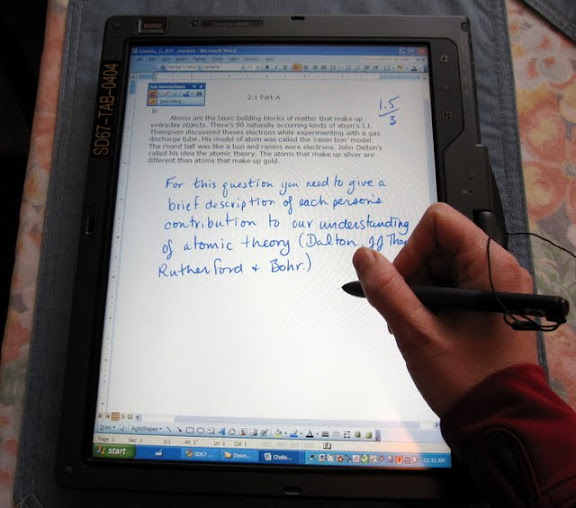
Our school has had 2 HP Tablet laptops for the past couple of years. If you haven't seen or used one of these, you have the ability to draw directly on the screen using a special pen. There is handwriting recognition software which can convert handwriting into typed text. Prior to this year I have used the tablets with a projector when teaching to write notes and instructions, just as you might use a felt pen and transparencies on an overhead projector.

Marking with the HP Tablet

Marking with the HP Tablet

Part 3: Putting It All Together


Here's what happens when you combine Moodle with the HP tablet.

I receive an e-mail alert that a student has submitted an assignment. I click on the link and am taken to the assignment in Moodle. I select the student's file which is downloaded on my computer and opened in word. Using the pen on the tablet I can easily mark and add comments to the assignment (marking with the pen tool is far easier than adding comment boxes). I then save the file with a new name. I go back to Moodle, input the grade, and upload the marked file. The student will now receive an e-mail alert to tell them that their work has been marked. Easy peasy!

Prior to using Moodle, when students e-mailed in their work I had to save it to a specific folder, mark it, go to my marks program to record the mark, save the marked file, attach it to an e-mail and send it to the student. Lots of clicks, lots of little pieces to remember to do.

Prior to using Moodle, most students did their work on paper and dropped it off at the school. There was a delay between the student finishing the work and me receiving it and then a delay between me marking the work and them picking it up. And then there are the (infrequent) times I'd forget to record the mark and the times that students claimed that they handed in their work but it disappeared or they claimed that the marked work never reached them. This doesn't happen with the new system! In addition, it is far more convenient to carry home just a laptop as opposed to envelopes of student work. Students also tended to hand in a whole whack of work all at once, preventing timely feedback. In Moodle students are less likely to do this.

I'm finding it difficult to convey how smooth and seamless the Moodle/tablet combination is! Let me just say that I actually look forward to marking now (sick, I know).

How 'Bout You?


Is there some system or technology that you use that actually helps your workflow to a significant degree? I'd love to hear about it.

Now if you'll excuse me, I'm going to see about getting all of those math courses I teach into Moodle ;-)

Monday, December 21, 2009

Most Influential Post of 2009

Requisite--So I Haven't Blogged For A While...


Lately my on-line participation has shifted more towards Twitter and the relatively new social networking site for BC educators, CEET (Community of Expertise in Educational Technology). Coupled with starting to using Moodle for course delivery and learning more about online course design, I've been less active with my blog.

Edublog Awards


Though I haven't been blogging much, I have watched with interest the Edublog Awards. I never got off my butt to make any nominations--so thank you to all those folks who did. The nomination list is always a good place to find interesting voices that are new to me.

Better Late Than Never... My Nomination


Though I didn't nominate anyone, I would like to highlight this post by Stephen Downes as the post that I found most influential in 2009. The post, titled The Monkeysphere Ideology, refers to a Cracked article from 2007 (yes, that Cracked.) From Downes:
Now let's look at the Cracked article, which suggests that each of us has a limit of about 150 people we can know and understand and relate to. The theory is based on Dunbar's number, and Cracked calls it - with more than a little alacrity - the 'monkeysphere'. The article, which was written in 2005, is making the rounds again.

Sock Monkey Group by sunsetgirl creations
One of the key points that Downes makes is:
Our failure lies not in the fact that we cannot know and understand more than 150 people. That's just a fact of physiology. Rather, our failure lies in how we characterize the remaining 99.99 percent of humanity: as though they were automatons.

I see this 'us and them' mentality pervading so much of life. Now whenever I do I think of the monkeysphere. For example; there has been so much in the news lately to do with global warming, and CBC ran this piece last week on the disputed island of Miningo. Because of global warming the water temperature in Lake Victoria is rising and water levels are dropping. This, along with overfishing, is resulting in increased pressure on the Nile perch stocks in the lake. Miningo island has become the flash point for Ugandan and Kenyan fishers who are finding it increasingly difficult to catch enough fish. From the CBC story:
The change in Lake Victoria is important because some 30 million people rely on it for their livelihood.

It is in situations like this that the monkeysphere ideology comes into play in a powerful way. Take this quote from the CBC story:

Kenyan fisherman Paul Odhiambo sorts through his catch of Nile perch in the bottom of his boat moored along Migingo's rocky shore. His anger rises quickly when thinking of Uganda.


"They just come with tear gas. And spraying us with the tear gas," he says. "So these people are not human. Just look at them. They are carrying guns. Why? Why carrying guns at this small place."


"So these people are not human." Where have you heard this before? Where else has this been justification for treating other human beings like garbage? But this is not a Uganda/Kenya problem. It is a human problem.


Since I read Downes' post, I've been thinking about the monkeysphere quite a bit. I am more aware when those around me and those I hear and read about "characterize the remaining 99.99 percent of humanity: as though they were automatons." or worse...


What About You?


What do you think about the monkeysphere? And what blog post, book , article, etc has influenced you in a big way this year? Thanks as always for reading, and I welcome comments. Cheers!

Saturday, October 3, 2009

Re-visiting the PD 2009 Meme

Early in the summer I was tagged for the Professional Development Meme 2009. This meme was started by Clif Mims. Normally I'm not crazy about memes--they remind me too much of chain letters--but I felt that this one was worth my time :-) For the meme I wrote a post about three goals I would like to accomplish over the summer. Below I'll list the goals and how I did.

  • Read 'Disrupting Class: How Disruptive Innovation Will Change the Way the World Learns'. Not only did I read the book, I blogged my reflections on it here.

  • Learn more about teaching using Moodle. I chose this as a goal because my district was moving over to using Moodle as our learning management system (LMS). Prior to that we offered on-line courses through Open School BC and their WebCT system. Regrettably, I did not spend much time on this particular goal. I was very familiar with Moodle from the perspective of a student and as a facilitator (thank you KnowSchools!) and I had taken an introductory course on Moodle in June. I guess I'm just saying that it's not like I was totally unprepared for the change over to Moodle. I hope to write more on the change over to Moodle in a little while.

  • Prepare for the two professional development sessions I will be facilitating at the end of the summer. I spent A LOT of time on this one. In fact I probably spent too much time on it. I'm guessing I put at least 10 hours of preparation for each session; the sessions were around 3.5 hours each. In the end I enjoyed doing the sessions, but found that it is really difficult to design a session for all levels of technical ability. I plan on writing more about these sessions, but at this point I'll just leave you with the link to the website I created to support the course. My goal was to provide participants with the information so that they could progress through the different topics at their own pace.


So, I feel good about how I did on two of the three goals and overall I'm pretty pleased with the PD part of my summer. Now excuse me while I go and spend a bit more time learning to Moodle...

Saturday, August 8, 2009

Disrupting Class

Earlier in the summer I read Disrupting Class, one of my summer PD goals. The following are my scattered reflections on the book.

*Note: the book focuses mainly on high school--I would be interested to
see what teachers in the elementary grades have to think about the
book.


Themes
  • Most schools approach teaching using the factory model; 30 kids in a class, assigned by age. It is difficult for teachers to address their students' individual learning styles. Some students get left behind and some get bored because everyone has to move along at the same pace. They mentioned that much of teacher training focuses on classroom management: an essential element in the factory model.
  • Technology can help; programs that teach kids according to their learning styles and only allow the student to move on when the student has mastered the content. We aren't there yet, but the authors are optimistic that collaborative on-line tools will be built that will allow teachers, students and others to create tutorials, lessons and so on that will help others to learn.
  • Cater to non-consumption. The authors point out that disruptive innovations usually target non-consumption. They give the example of the early SONY transistor radios; they were cheap and the sound wasn't great, but they were popular with teenagers who could not afford the only other option--big, expensive table top or floor model radios. Teenagers, previously non-consumers of radios, became the new consumers of the disruptive technology. In education the areas where we will see change is with courses that schools cannot offer due to student numbers and other factors. Distributed learning schools are not going to be successful if they are focusing on courses that regular bricks and mortars school already offer.
  • The disruptive innovations will not be successful under the current structures. He gave the example of Toyota's experience with hybrid cars. Toyota put together a team to build a hybrid from the ground up. They didn't have to use existing components and make do. They could re-engineer all of the systems so that the final product was efficient and worked well. Other car manufacturers did not take this approach, and their hybrid cars are inferior.
The Journey from Here to There

In my position as a teacher in a distributed learning (DL) high school I can see the growth in demand for a different model of schooling. In my district budgets are getting tighter and enrollment is dropping so creative solutions are being looked at. This fall all of our grade 10 students will be enrolled in Planning 10 (a core course) delivered in an on-line format. Doing Planning 10 on-line, outside of the time-table, will allow the students more choice; there won't be timetable clashes between planning 10 and other courses. It will also be possible for students to take more than a full load of courses. One can't help but wonder if being exposed to planning 10 on-line will encourage students to take other courses on-line, that currently are not offered at their school.

Right now, many of the on-line courses I have seen are not geared towards a range of learners. Typically, the kids who deal well with text, and are self disciplined enough to stick to a time line do well. There is not a lot of differentiation... yet. A lot of the talk at the distributed learning conference I attended in the spring (Virtual School Society Annual Spring Conference) was about how to cater to the big range of students who are now exploring distributed/on-line learning. People on the front lines want modular courses, where you can put together a course that is designed to meet the needs of the learner. I think we'll start to see these. Currently though, the cost to put together a complete on-line course can be quite high. I've heard estimates of $40,000 to produce one on-line course. On the one hand I am doubtful that we will see the modularity and differentiation that is written about in Disrupting Class, but on the other hand I am constantly amazed at the incredible applications that are available on the web, so who knows?

I'd like to know a bit more about the authors' visions of the role of the teacher in this new model. Right now as a DL teacher I can tell you that one of my biggest challenges is getting good lines of communication flowing between myself and my students. I've written about communication with my students here and here. Currently I rely on e-mail and phone to communicate with students, but recently it occurred to me that e-mail is very old school--I've got to explore the ways that my students are most comfortable communicating. For example, many students don't use e-mail, but are constantly texting; would they text me with their questions if that was an option?

Canadian Perspective


It definitely seems like it is a much more tumultuous time in education in the USA than in Canada. Frequently in Disrupting Class the authors referred to the negative impact of teacher unions and the tension between public schools and charter schools. That is not to say that those tensions do not exist in Canada; just that the magnitude is much much lower.

The Wrap Up

Where do you see the future of on-line learning? If you read the book, what did you think of it? As always, thanks for reading my post!

Monday, July 13, 2009

Reflecting on 08/09

Before I really get into my plans/goals for the 09/10 school year, I thought it would be a good idea to reflect on the past year. 

Goals and Results 
Prior to the school year starting, and as it went along I had a number of goals.  I'll discuss them below with a review of how they worked out.

'Malinconia. L'ultima partitella (the last match of+the+summer)'

  1. Get more face-to-face time with my students (I work at a distributed learning school--students work at home on the curriculum that we provide):  In the 07/08 school year my colleague, Jodie, ran a humanities class for her grade 8-10 students and I could see the benefits of this weekly face-to-face time; it allowed for discussions, one-on-one tutoring, and an opportunity to speak to students about their progress.  So for this past school year Jodie and I offered a general high school class for 2 hours on Thursday mornings.  Students were encouraged to attend, but for many students it was optional.  For other students at risk for failure the class was mandatory.  The benefit to this structure was that we had weekly face-to-face time with the students who needed it most.  The drawback was that with the large number of students present, all at different levels and at different points in their programs, it became difficult to conduct effective lessons.  I think that the benefits outweighed the drawbacks though.  In my experience one of the key factors for a student to succeed in a distributed learning program at the high school level is good communication with the teacher.  These face-to-face classes facilitated this.
  2. Improve communication with students:  I've written about the communication aspect before in this post.  This year many of the courses I was responsible for were paper based which meant that my kids were not in a Learning Management System (LMS) with built in e-mail.  I wouldn't have thought this would be a problem, but a surprising number of students do not have their own e-mail accounts that they use regularly--I guess they rely more on IM and sites like Facebook to communicate.  Partly to address this, Jodie and I (ok, it was mostly Jodie) set up a 'Student Lounge' in WebCT.  Most of our students take at least one course in the WebCT LMS; enrolling all of them in the 'Student Lounge' meant that it was easy to send out batch e-mails and it was easy for them to e-mail us.  We had other plans to showcase student work along with some general discussions.  Those didn't materialize, but I definitely had more students contacting me with questions than prior to the 'Lounge', so I'm pretty happy with the results.
  3. Provide opportunities for students to conduct labs at our school with support:  There are some virtual labs that my students do, but there are also a good number of traditional labs the students are expected to do.  To do a lab at home on your own can be frustrating.  Let's face it, even in a typical classroom kids get frustrated because they don't get the 'right' results, or they are unsure what to do.  This year my goal was to have time during some of the weekly high school class (see #1 above) to help students with labs.  This was not a big success.  I was able to do a couple of labs with the kids, but because the students start at different times and end up in different places in the course, it was difficult to choose a lab that all students were ready for.
  4. Improve my weekly Elluminate sessions: In the 07/08 school year I started doing weekly Elluminate sessions.  One week was for science and the next was for math.  We met for 30 minutes for each grade.  I gave a mini-lesson reviewing old concepts and introducing new ones.  Then there was time for questions from the students. I started out this way again in 08/09.  As usual the problem is that very quickly the students get spread out in their courses, so preparing a mini-lesson becomes difficult.  Over the course of the year the sessions shifted more to being a straight tutorial.  I find Elluminate to be very useful to help students with their math.  It is difficult to answer math questions over the phone or via e-mail, but using the whiteboard feature in Elluminate allows you to write out the math symbols easily and have the student help to answer the question.  For next year I think I will spend more time recording mini-lessons so that I can build up an archive that students can access as needed and use the Elluminate times as straight tutorials.  I have to work on attendance too.  The sessions are not mandatory and attendance is not always great.  I'll have to look at ways to improve this.
Future Plans
Those are the main goals I pursued this year.  If you have any thoughts on how I can improve on these areas, I would love to hear it.  I plan on posting again soon with my goals for next year.  I hope to make this an annual event: posting goals prior to the new school year and reviewing them once the year is over.  If you already do this, do you find it useful?  If you don't, would you consider it to be helpful.  As always, thanks for reading this!


Friday, July 10, 2009

Making PD Sticky

I've been thinking a lot about professional development (PD) and technology integration the last little while.


Questions by Oberazzi

My Questions:
  • How do you make PD sticky?  We've all gone to a conference or PD day, learned some wonderful (or not) things, then gone back to our classrooms never to revisit those ideas again.  How to make them sticky? 
  • How do you encourage teachers to start their own Professional Learning Networks (PLN) and provide them with the skills to be successful? 
  • How do you support the sharing of ideas and resources within your local area?  I've been very lucky to connect with wonderful educators from around the English speaking world, but know very little about the teachers in my own small school district.
  • How do you truly integrate technology and support your teachers while doing so?
Over at Charlie Roy's blog I left this comment on technology integration:
The training element of introducing new technology is always a challenge. The approach that you took this year sounds like a good start. You definitely have to meet people where they are at. In my dream school the director of technology would be a consultant. S/he would meet with teachers one on one; the individual teachers would outline what their objectives with a particular unit or project are and the director of tech would come up with a variety of ways to integrate technology. Doing a poetry unit? Let me suggest using Wordles, or Voice Threads, or... and here's how to proceed.
I think that you also have to find the people in your school or district who are really into integrating technology into their teaching and/or professional learning and support them like crazy.  You're going to see great things from them and the goal is that they will inspire others.  I'm not sure that converting people overtly is going to work, but diffusion just might do it.

What do you think?  Do you have answers to my questions above?  I'm happy for some push back and sharing of ideas.  Cheers!


Tuesday, June 30, 2009

Professional Development Meme 2009

I was reading about the meme on Louise Maine's blog and thought it sounded like a good one, and low and behold she had tagged me.  Well here goes!

Directions

Summer can be a great time for professional development. It is an opportunity to learn more about a topic, read a particular work or the works of a particular author, beef up an existing unit of instruction, advance one’s technical skills, work on that advanced degree or certification, pick up a new hobby, and finish many of the other items on our ever-growing To Do Lists. Let’s make Summer 2009 a time when we actually get to accomplish a few of those things and enjoy the thrill of marking them off our lists.

The Rules

  1. Pick 1-3 professional development goals and commit to achieving them this summer.

  2. For the purposes of this activity the end of summer will be Labor Day (09/07/09).

  3. Post the above directions along with your 1-3 goals on your blog.

  4. Title your post Professional Development Meme 2009 and link back/trackback to http://clifmims.com/blog/archives/2447.

  5. Use the following tag/ keyword/ category on your post: pdmeme09.

  6. Tag 5-8 others to participate in the meme.

  7. Achieve your goals and "develop professionally."

  8. Commit to sharing your results on your blog during early or mid-September.


My Professional Development Goals

  1. Read 'Disrupting Class; How Disruptive Innovation Will Change the Way the World Learns'

  2. Learn more about teaching using Moodle (my district is switching to Moodle in the fall and I will be responsible for teaching at least 4 courses using this Learning Management System)

  3. Prepare for the two professional development sessions I will be facilitating at the end of the summer


I'm really looking forward to summer break not only to accomplish the goals above, but more importantly to decompress and enjoy time with friends and family.

Now, I'm going to break rule #6 and not explicitly tag anyone.  If you are reading this, first off thanks!  Secondly, if you haven't been tagged already and think you'd like to participate, then consider yourself tagged ;-)

    Tuesday, April 28, 2009

    Quick Reflections on VSS 2009

    Though the title says quick reflections, I've been reflecting on the Virtual School Society Annual Spring Conference since the first round of sessions kicked off.  The VSS and the pre-conference are an opportunity for people involved in distributed learning (DL) and educators who use digital technology in education to get together and share what they've been up to.  Briefly, here are some of my take aways:


    Mast reflections by DonGato CC Attribution, Noncommercial, No Derivative works.


    • Tying in with Michael Horn's keynote, DisruptingClass: How Disruptive Innovation is Changing the Way the World Learns, web 2.0 tools and the young field of DL are part of the current disruptive innovation.  Horn says that to be successful, disruptive innovations must be allowed to be separate from the status quo and not judged by the current/old norms.  My take--Don't force your DL program to be like the regular school program; let your DL teachers and admin experiment and innovate--they have the potential to help many of those kids whose needs are not currently being met in schools.

    • DL schools don't necessarily fit with the rest of the school system

    • there is as shift to teaching mastery: a DL environment is the perfect place for this

    • More educators are finding that tools like Elluminate Live! can be very powerful, especially with math instruction and tutoring.  (**A Province-wide license means that Elluminate Live! is free to use for all BC educators--go here to find out more)

    • A surprising small number of DL educators are on Twitter, but perhaps more will be after Ellen Wagner's keynote :-)

    • A surprising number of delegates have not yet dipped their toes in the web 2.0 waters

    • There is a shift away from the tools to the pedagogy of teaching and learning in a DL environment

    • No two DL schools are alike--some offer only synchronous programs, some offer asynchronous and continuous enrollment, some are 12 month operations, some are big, some are small, some offer special ed, some don't...

    • More people are willing to share their stuff; not just their ideas, but the things they have created.


    My last point is BIG.  Two years ago when I went to the predecessor of the VSS conference, the BC Ed Online, the mood was one of competition.  We were all competing for the same pool of DL students.  Talk was of how to protect what we've created, not how to share.   I'm glad for the change in perspective.

    My brain will be mulling over the VSS sessions and discussions for quite a while to come and this post was a chance for me to finally put down my thoughts.  The conference will inform the direction my school takes over the next little while, and that is pretty exciting.

    The Last Words
    My questions for you are, (1) have you noticed a shift towards sharing?  I mean, it's so gosh darned easy now to share what you have created in the digital world, shouldn't we all be sharing?  Doesn't that give more value to what you've spent time creating?  (2) Are you starting to notice a shift away from the tools and towards best practices in this increasingly digital world?

    As always, thanks for reading!